
Pocket Casts - Podcast App
Automattic, IncNews & Magazines
4.819.98K Reviews
- Version
- Varies With Device
- Installs
- 1.00M
- Age Rating
- Teen
Screenshots

Our Review of Pocket Casts - Podcast App
 Analysis by Appyee
I notice the difference between a podcast app that simply plays an episode and one that helps me choose, queue, and manage what I want to hear. Pocket Casts is aimed at listeners who want that extra control, especially when their routines move between short sessions and longer stretches. Its usefulness also depends on where I am: browsing a catalog, starting an episode on a connection, or trying to keep listening when the network is less dependable are different parts of the experience.
When connectivity changes the listening routine
Finding a show and playing it are separate steps, and a weak connection can make that distinction matter. I’d use a stable connection to explore unfamiliar podcasts, read through choices, and decide what belongs in my queue, rather than leaving discovery until I’m already rushing out the door. That simple habit makes the app feel less like a last-minute search tool and more like a listening library I’ve prepared for the day.
For a commute, a walk, or a stretch of errands, the practical question is whether the episode I want is ready to play in the situation I’m heading into. Pocket Casts is designed around streaming, downloading, and organizing podcasts, but I wouldn’t assume that every episode is available without a connection unless I had checked its status in the app. My advice is to confirm what you intend to hear before leaving reliable Wi-Fi, particularly if you know your route has dead spots.
There’s also a difference between network trouble and an episode that simply isn’t in the queue. When I plan ahead, I can use the queue to make the next choice obvious instead of fumbling through search while walking or getting ready. That is a small workflow change, but it matters: I spend less time staring at my phone and more time listening.
A fit for commutes, chores, and focused listening
The strongest audience here is someone who follows several shows and wants a little order without turning podcast listening into a project. A queue can group a short news episode with a longer interview, while playback options let me adjust the pace to suit the moment. At home, the sleep timer suits a different routine: I can listen as I wind down without relying on myself to remember to stop playback.
Picture a normal weekday: I check for new episodes over breakfast, choose a few for later, then start the first one on the way to work. If the commute shifts from a strong signal to a tunnel or underground section, I’m glad I thought about availability before leaving. Later, I can pick a different episode for chores or send audio to a compatible speaker when I want to listen without holding my phone. The app’s appeal is that these are parts of one listening habit, not separate tasks in unrelated tools.
It is less compelling if you only listen occasionally and are content to play whatever a general audio or media app happens to surface. A dedicated podcast manager earns its place when you care about keeping subscriptions, queues, and playback preferences together. If you prefer the simplest possible interface and rarely revisit shows, the extra controls and discovery areas may feel like more app than you need.
Choosing it over simpler alternatives
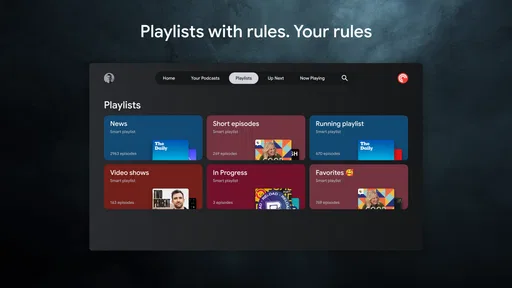
Compared with a basic player, Pocket Casts puts more emphasis on organizing a library and shaping playback. That can be valuable if you switch between multiple programs, use filters to separate listening needs, or want a queue that reflects the time you have available. A general streaming service may be more convenient if your listening is already centered on music and you only dip into a podcast now and then; a more minimal podcast app may be preferable if you never use discovery or playback adjustments.
Its breadth is a trade-off, not an automatic advantage. A newcomer may need a little time to understand which screen is best for finding shows, managing episodes, and returning to the current queue. I’d start by following only the podcasts I genuinely expect to hear, then make one useful filter or queue rather than trying to customize everything at once. That keeps the library manageable and makes the app’s extra options feel practical rather than decorative.
Small habits that prevent listening friction
One useful approach is to treat the queue as a plan rather than a storage bin. Put in the episodes you expect to finish soon, and leave new discoveries in the library until you know they fit. This makes it easier to choose something suitable for a short walk without accidentally starting a long episode you cannot finish.
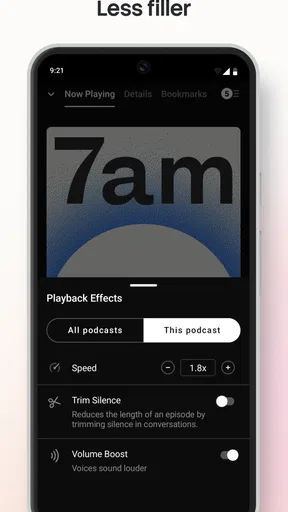
Playback speed, silence trimming, and voice enhancement can each help in a different way, but I wouldn’t apply every adjustment to every show. Faster playback may suit a familiar, information-heavy program; an interview with overlapping speakers may be clearer at a more natural pace. I’d test settings on one episode before making them part of my routine, since what saves time in one format can make another tiring to follow.
Moving between a phone, tablet, or computer can make listening more flexible, and syncing is useful when I want to resume somewhere else. Still, for an important handoff, I’d check that the right episode and position have carried over before closing the device I started on. Likewise, importing an OPML file is a helpful route when changing podcast apps, but I’d review the resulting subscriptions afterward instead of assuming the new library will be organized exactly as before.
What to expect from the app itself
Pocket Casts is a free app from Automattic, Inc in the news and magazines space. It has a 4.8 average from around 113,000 ratings, and more than a million installs. It is rated Teen. In-app purchases range from $3.99 to $99.99 per item, so I’d check what a particular purchase offers before deciding whether it is relevant to my use. The app has been available since March 6, 2011, giving it a long history as a podcast-focused option.
That background may reassure listeners who want a dedicated tool rather than a brand-new experiment, but popularity alone cannot decide whether its layout suits you. The better test is whether you actually use the queue, filters, discovery, and playback controls. If your listening is mostly one show played from start to finish, a simpler choice may be easier to live with. If you routinely balance several subscriptions, those tools can save small bits of effort throughout the week.
Getting Started with Pocket Casts
First things first, downloading and setting up Pocket Casts is a breeze. Available on both Android and iOS, the app seamlessly integrates with your device. Once you’ve installed it, you’re greeted with a clean and intuitive interface that’s a joy to navigate. The app offers a quick start guide that helps you get familiar with its primary features. It’s like your personal tour guide, minus the annoying chatter.
Interface and Usability
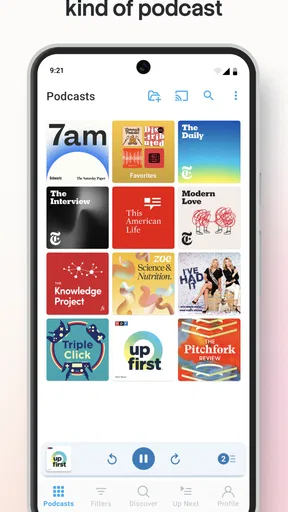
Now, I’m all about aesthetics, and Pocket Casts doesn’t disappoint. The design is sleek and vibrant, making it easy on the eyes whether you’re browsing through your library or discovering new podcasts. The home screen is customizable, allowing you to tailor it to show your favorite shows, new episodes, or a mix of both. Navigation is straightforward with a bottom menu featuring icons for Home, Discover, Profile, and Filters.
The app also supports gestures, which makes moving through episodes a smooth experience. Swipe left, swipe right, tap here, tap there—it's all very intuitive. Plus, the dark mode is just perfect for those late-night binge sessions.
Discovering Content
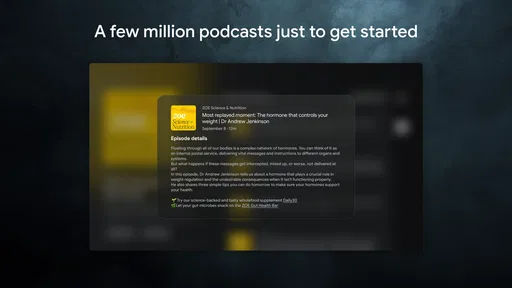
Here’s where Pocket Casts truly shines. The Discover section is a treasure trove of content. It’s like having a personal curator who knows what you love. The app offers curated lists, trending podcasts, and personalized recommendations based on your listening habits. There’s also a neat little feature that lets you explore by category, so whether you’re into true crime, comedy, or tech, you’re covered.
If you’re ever in the mood to try something new, the app’s robust search functionality is your best friend. Just type in a keyword or a show name, and you’re good to go.
Listening Experience
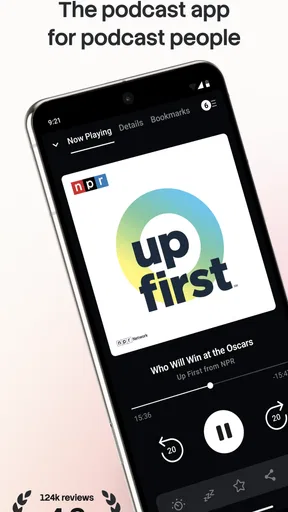
The listening experience is where Pocket Casts really pulls you in. The playback controls are comprehensive, with options to speed up or slow down the audio, trim silence, and even boost voices. The app also supports Chromecast and AirPlay, which means you can enjoy your podcasts on the big screen or through your favorite speakers.
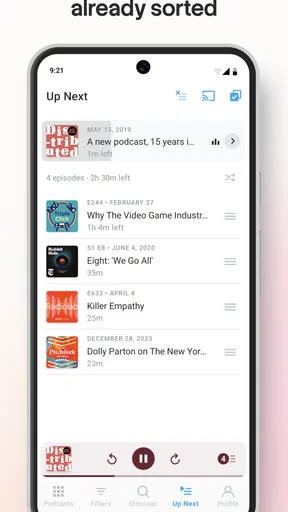
But wait, there’s more! The app allows you to create custom playback queues, which is perfect for those marathon listening sessions. And let’s not forget the sleep timer—a must-have for those of us who love to fall asleep to our favorite shows.
Additional Features
Pocket Casts isn’t just about the basics. It offers a few extra goodies that are worth mentioning. The app lets you import and export OPML, which is great if you’re switching from another podcast app. There’s also a desktop version available, so you can listen while you work without missing a beat.
Another nifty feature is the ability to backup and sync across devices. This means you can start listening on your phone and pick up right where you left off on your tablet or computer. It’s seamless and incredibly convenient.
Final Thoughts
So, is Pocket Casts worth your time? In my opinion, absolutely. It’s an app that’s designed with the user in mind, offering a blend of aesthetics, functionality, and features that enhance the overall podcast experience. Whether you’re a casual listener or a podcast aficionado, Pocket Casts has something to offer.
With its user-friendly interface, rich content discovery options, and top-notch playback features, Pocket Casts is more than just a podcast app. It’s a companion for your listening journey, one that understands your needs and adapts to your preferences. So, go ahead, give it a whirl. I promise you won’t regret it!
Privacy and Permissions
See what permissions an app requests and how it handles your data.
- Photos/Media/Files
- read the contents of your USB storage, modify or delete the contents of your USB storage
- Storage
- read the contents of your USB storage, modify or delete the contents of your USB storage
- Wi-Fi connection information
- view Wi-Fi connections
- Other
- view network connections, pair with Bluetooth devices, change network connectivity, full network access, run at startup, control vibration, prevent device from sleeping, Google Play license check
Verdict
Strengths of Pocket Casts - Podcast App
- User-friendly interface makes navigation easy.
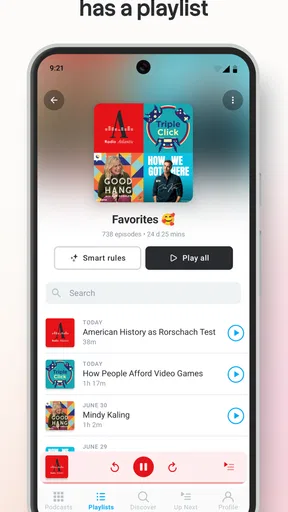
- Customizable playlists enhance user experience.
- Offline listening available for on-the-go use.
- Cross-platform syncing is seamless.
- Advanced playback controls enhance usability.
Limitations of Pocket Casts - Podcast App
- Limited free version features compared to premium.
- Occasional app crashes reported by users.
- Lacks integration with some smart speakers.
- No support for video podcasts.
- Search functionality could be improved.
Other Releases by Automattic, Inc
View All
Day One Diary: Daily Journal
Lifestyle4.6
Similar Picks in This Category
View All
Google News - Daily Headlines
Google LLC4.0

X
X Corp.4.8

Flipboard:Your Social Magazine
Flipboard3.4

Opera News: breaking & local
Opera4.5

Hindi News by Dainik Bhaskar
Dainik Bhaskar Group4.0

Way2News Daily News App
Way2News ( Formerly Way2SMS )4.6
Frequently Asked Questions
What features does Pocket Casts offer for managing podcasts?
Pocket Casts provides a comprehensive suite of features for managing podcasts, including custom filters, variable playback speed, and automatic episode downloading. Users can create playlists, trim silence, and even enjoy a sleep timer for uninterrupted listening. The app also supports cross-device syncing, ensuring a seamless experience across all your devices.
Is Pocket Casts available for free?
Pocket Casts offers a free version with essential features to get you started. For users seeking additional functionalities, such as desktop apps and exclusive themes, Pocket Casts Plus is available via a subscription. This paid tier enhances the user experience with extra customization and convenience options.
How does Pocket Casts enhance the listening experience?
Pocket Casts enhances the listening experience through features like volume boost and silence trimming, which improve audio clarity and reduce unnecessary pauses. The app also allows users to adjust playback speed, providing flexibility to consume content at their preferred pace. These enhancements ensure a tailored and enjoyable podcast experience.
Can I sync my podcasts across multiple devices with Pocket Casts?
Yes, Pocket Casts offers seamless cross-device syncing. This feature allows users to pick up where they left off on any device, ensuring a unified experience. Whether you're using a smartphone, tablet, or desktop, Pocket Casts keeps your subscriptions and playback position synchronized effortlessly.
Is Pocket Casts compatible with smart speakers and other devices?
Pocket Casts supports integration with a variety of smart speakers and devices. Users can link their accounts to Google Home, Amazon Alexa, and Apple HomeKit, allowing for hands-free control and playback. This compatibility extends the app’s functionality, making it a versatile choice for podcast enthusiasts.
